

^^ This is also a great way of doing things and can be easier when dealing with complex inversions at different orientations.
All Comments
19501 to 19520 of 19724Filter comments
Element 115's Handbuilding Bible
Episode one: The curse of the banking wobble
Im sure everybody has encountered this issue before, some of you may already know how to deal with it but for those who do not here is a rundown on the problem and its solution.
Our situation
As you can see below we have an overbanked turn into a shallow dive, followed by a pullout. From an off ride perspective it looks perfectly fine.
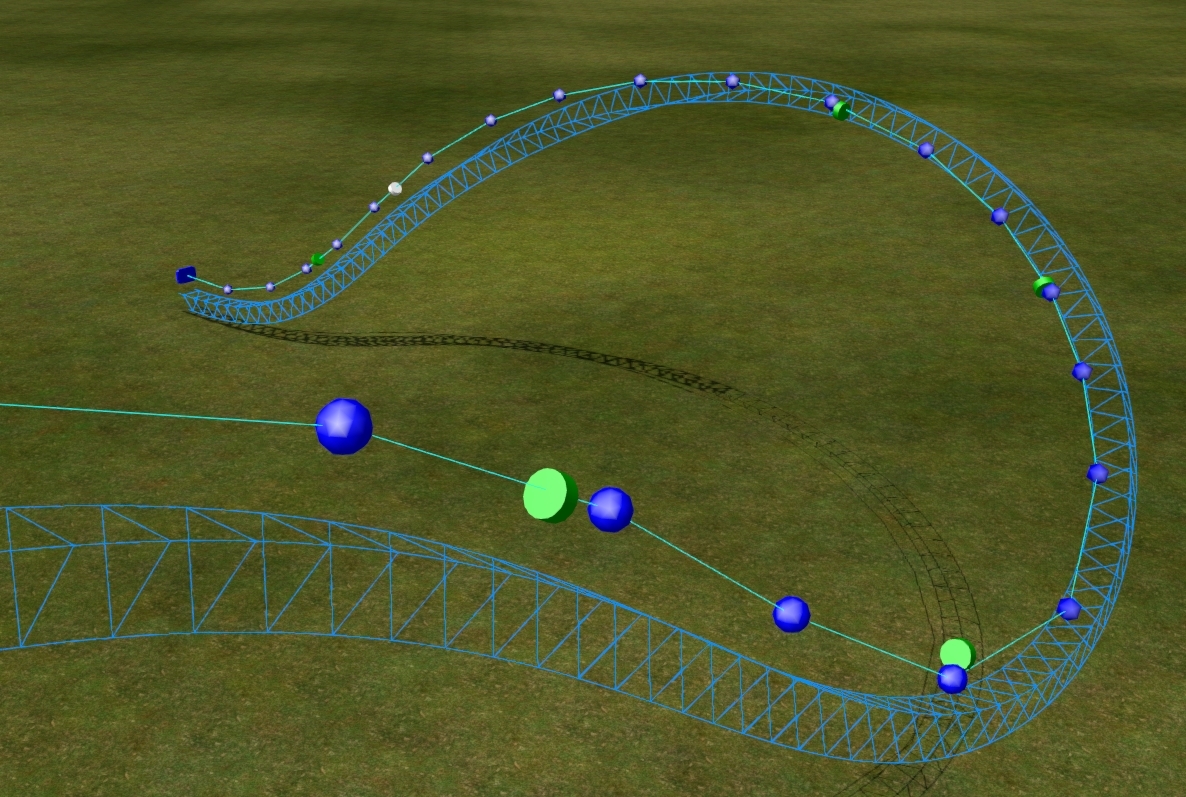

As you can see, on the exit of the drop i have positioned two nodes, these nodes are set to zero degrees banking to flatten out the track before the next element. By riding the coaster in editor track view, we can notice the wobble immediately.

What causes it?
Nolimits 2 uses continuous rolling in its banking, therefore there is often some overcompensation when banking to zero with a fairly high roll rate. Now i could just set the first roll node to strict 0 degrees and delete the second one entirely, this would eliminate the wobble but bring in a whole new issue. Your lovely transition now rides like a knock off Pinfari, if you happen to be creating an actual knock off Pinfari then you can leave now and i wish you good luck, but for those of us who are not lets continue.
Eliminating the wobble
Lets start by looking at our transition from the top view with the view mode set to "Spline" from the drop down box.

By following the lower spine of the track, we can see that it it crosses over the yellow coaster spline once, then returns to the centre and continues. This is the source of our wobble.
To fix the wobble we will bank the roll node before the final roll node by one degree at a time, until the spine of the wireframe track aligns perfectly with the yellow coaster spline and does not cross over it, the process is shown below.

You can check the wobble has been removed by re riding your coaster in track view.

As you can see, there is now no wobble at all and the transition flows smoothly to flat track, you are on your way to a lovely flowing layout free of strict banking and overcompensating rolls.
I know most people here already know how to stop this issue, this is meant more for people fairly new to No Limits 2 that have encountered this problem. I will move on to more advanced stuff in future posts.
Welcome to your destination for handbuilding techniques and advice
In this thread i will cover all of the techniques i use to hand-build a coaster layout within No limits 2 from scratch, please note that the methods i showcase are heavily influenced by the style of coasters i usually build, these being not related to any specific manufacturer. Some of the ways i shape will alter the path of the track, spline smoothing especially will change the roll and shaping. Therefore when creating a ride to emulate the style of a manufacturer such as b&m i would recommend not using it as it may undo all of the effort you put it to making the shape accurate to their style, same goes for recreations. If you are making your own style of custom coaster, i highly recommend you try out some of the methods i post within the following millennia.
Some of the posts will focus on common problems encountered by beginners while others will delve into more advanced methods used to create perfect smooth splines and constant radius turns.
Please note that the techniques that i show are just one way to do things, do not consider them the ONLY way to do it, or the RIGHT way to do it, they are simply how i have learned to do things over my time within No Limits, some people will disagree with them and have their own way of doing it and that's fine, infact its what makes communities like this thrive, if there was only one way of doing things, it would get boring very fast!
Anyway, rambling aside i hope i can help some people learn some new things over the course of the following posts, feel free to ask any questions regarding specific problems you encounter, as every situation can be different and require different techniques to solve.

^I use this too, but I've found both methods to work. The way Calvin is talking about works the same as Element's, but it's focused on the G-Force comb and it works in any view. You tick the roll over slowly until all of the lateral Gs are uniformly low and on the same side of the comb.

Tim posted on December 25th, 2017
Seriously.
I'm in a Christmas mood, i will take that answer from Paradox as correct, now every one Appie ?
So Paradox, u up next.

I actually use the G force comb to get the exaggerated roll in just the right place. I do a couple other special things when handbuilding to make my rides smoother (all my rides were handbuilt)

RE: Capriolo's
I went on one that was in london (Darren Matthew's Airmaxx) , It didn't really impress me much and I much favoured the Mondial Furioso I had been on at winter wonderland half a year before (specifically Van Reken's No Limit). Its basically a smaller version of the Capriolo, but I found it to be way more snappy and intense
Seriously.

On mobile, the message button on someone's profile is behind that person's picture. Not a big issue, it's still usable but some of the words are cut off.
We need a new stickied reference guide for this stuff.
i
Ok, all in favour of a dedicated thread say i
^Well, that's true. But that could also happen to this thread.
The FVD thread on NLE was also just occasionally used. Plus, a helpful hand-building thread could be pinned so that everyone can see it all the time.
i am debating starting my own thread, but i feel it will just end up sinking to the bottom after a while and the info will be lost.
You should make this a seperate thread, actually. The quality of your explanation is really good!

Nicely explained! Its amazing how much better coasters are if the banking is nice, which seems to be a issue with beginners' tracks.
Element 115s Guide to smooth handbuilding
Episode one: the curse of the banking wobble
Im sure everybody has encountered this issue before, some of you may already know how to deal with it but for those who do not here is a rundown on the problem and its solution.
Our situation
As you can see below we have an overbanked turn into a shallow dive, followed by a pullout. From an off ride perspective it looks perfectly fine.
As you can see, on the exit of the drop i have positioned two nodes, these nodes are set to zero degrees banking to flatten out the track before the next element. By riding the coaster in editor track view, we can notice the wobble immediately.
What causes it?
Nolimits 2 uses continuous rolling in its banking, therefore there is often some overcompensation when banking to zero with a fairly high roll rate. Now i could just set the first roll node to strict 0 degrees and delete the second one entirely, this would eliminate the wobble but bring in a whole new issue. Your lovely transition now rides like a knock off Pinfari, if you happen to be creating an actual knock off Pinfari then you can leave now and i wish you good luck, but for those of us who are not lets continue.
Eliminating the wobble
Lets start by looking at our transition from the top view with the view mode set to "Spline" from the drop down box.
By following the lower spine of the track, we can see that it it crosses over the yellow coaster spline once, then returns to the centre and continues. This is the source of our wobble.
To fix the wobble we will bank the roll node before the final roll node by one degree at a time, until the spine of the wireframe track aligns perfectly with the yellow coaster spline and does not cross over it, the process is shown below.
You can check the wobble has been removed by re riding your coaster in track view.
As you can see, there is now no wobble at all and the transition flows smoothly to flat track, you are on your way to a lovely flowing layout free of strict banking and overcompensating rolls.
I know most people here already know how to stop this issue, this is meant more for people fairly new to Nolimits 2 that have encountered this problem. I will move on to more advanced stuff in future posts.

Either that or just make it more obvious that you can only use the certain part.
Another suggestion - I LOVE the feature of track descriptions for each coaster in the park, such a clever implementation, I wouldn’t change this, however I would change the 30 Character limit for the coaster name. The sim doesn’t have this limit, so for example on Terra Phase 3 I have “Arborak - Guardian of the Forest”, and it uploads it as such and has the full name, but then I can’t edit anything else without shortening the name, because it tells me the name is too long.
The simplest way to reduce the pumping is to insert more vertices then depump a few more times.
You can take it further by exporting the track spline if you have the pro version of nl2, then importing it with 0.5m spacing and depumping that. (only do this when you have finished one section of track between two flat points such as lifts and mcbrs, ill explain more in my future post about this method)
here are the results:

I don't know why, but the depumper can't get rid of these inconsistent radii. Is there something I can do?

19501 to 19520 of 19724