
All Comments
15001 to 15020 of 19728Filter comments


loving the "re tracked" section on the Dinn woodie, love details like that. Keep it up guys its looking great!
Hello,
after reading about modifier, i have searched for the "stack" of it and asked myself, why the export to dae-file works with objects where i have used boolean modifier ("subtract", e.g. for holes). But then i remember, that i have clicked "apply" in modifier. Modiefier is "applied" at once after celecting and setting some parameters with out clicking "apply". Then you see these parameters, this is the "stack" (i had only one entry until now). If i click "apply", modifiers becomes normal objects (in my case meshes). But then you cannot alter modifier parameters any more so you have to make adjustments before "apply". It is like converting text to mesh, then you cannot edit text any more too.
With "array" i have not clicked "apply" because i saw the result before. Then export to dae does not export additional objects. But if you click "apply" for modifier, then export works. So for me and this problem it is solved.
Not solved is still the copying of texture files for copied objects. I can reassign texture files by hand, but it is a lot of work.
Best regards
Hello,
i have a problem with a simple script. I have a water wheel that should rotate around the Z-axis, its axle is the Z-axis itself. I have copied the example file from NoLimits help and used it in a test park with a wheel that has its axle in Z-direction. That works, i have change
sco.setRotation(0, 0, totalTime);
But in my other park the wheel is rotated by 90° in Y, so its axle shows now in x.diretion. But now it is not rotating. If i change
sco.setRotation(totalTime, 0, 0);
wheel flips around X-axis, nut is not rotated by 90° around Y.
What is to do if your rotating object has another orientation (rotate Y) as 0°. I think, there is no problem, when it is rotating around Y...
Also there is one error message, that i do not understand:
if i write
sco.setRotation(0, 0, totalTime/2);
in my test park, wheel rotates with half speed (one rotation in ca. 12.6 seconds = 2PI), but when i write
sco.setRotation(0, 0, 0.5totalTime);
i get an erroe message: "Unknown Methof: setRotation(int, int, double);"
But totalTime is a float or double, it is the time in seconds. I have added code that resets totalTime after it becomes >10, every 10 seconds rotations jumps, but rotation itself is smooth (so a time of e.g. 2.134 seconds results in correct angle of wheel for that time). But i cannot use formulas with float constants.
Best regards

You're welcome for that one Ol' ;)

“Golden Showers Water Park” -Dan
Btw thanks y’all!
@ Kadske, No problem, i hope u found out how to place the correct code now for YT video, its the same as with pictures :


Update Number 1
Hello everyone! Long time no updates. Sorry 'bout that. Promise it won't happen again.
Before we get started, we want to welcome the newest member to our project, Olmisery!
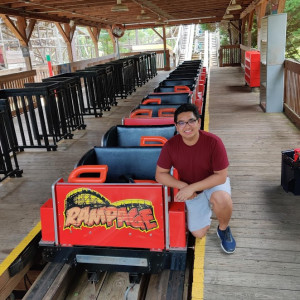
Olmisery will be a helping hand in forming this park into something super special. He has already contributed a great amount of work in the park, with most notably a GCI roller coaster named RAMPAGE (name subject to change)!
We're very excited to have him on the team and we look forward to his awesome additions to the park.
Now, let's get down and DIRTY!
Logos
First off, this isn't a Cedar Fair Park without its Cedar Fair Logo, right? So we made one!
 Hope it looks good. If anyone wants the font, PM me and I'll give you the name of it.
Now, of course, we can't forget about the waterpark too (yes we're building a waterpark as well)!
 Of course, I'm still working on this one (mostly the G as it's kinda pissing me off), but its pretty much done. We can't wait to plaster these things all over.
Screenshots
So, there is a LOT to show. Please keep in mind that all of this is HEAVY WIP, so you are going to see a lot of unfinished areas/rides. Nonetheless, we hope you like what we have so far!
First off, we are now a little bit more comfortable in showing off Inferno, so here are a few screenshots of it. This is a B&M floorless coaster featuring 6 inversions, a 160 foot lift hill, and a length of 4117 feet, making it the 2nd longest floorless coaster in the world!


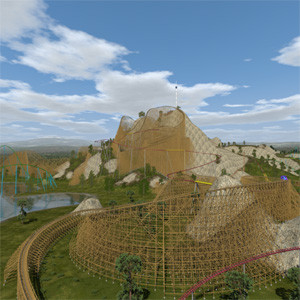
We also have another new coaster to show off! Here is Timber Mountain, our Dinn woodie. Currently in our park, it has the reputation for being really bad. Olmisery happily did the bracing for this ride and we think it looks awesome! We will have more updates on this woodie ASAP.


Our last ride we have is the one we mentioned earlier, the GCI woodie named Rampage. This thing is inspired by Renegade, Mystic Timbers, and Goldstriker. Again, heavy WIP.


Conclusion
So, that's all for now. Not too much has happened to Peregrine, Apache, and Corkscrew, so we're holding those off on updates for now. We'll show those three off hopefully at a later time. We hope that you enjoyed this update, and we can't wait to show you guys even more new things. With Olmisery on the team, we hope we can get a lot more done faster. If you have any constructive criticism, please make sure to leave a comment as usual. Until next time!
PS: We are still looking for someone to help make Peregrine's 2nd gen dive trains. If you're interested, please contact me or Thrillspot. Thanks!
~Pupper, Thrillspot, and Olmisery
Here's my link.
And here’s mine https://www.twitch.tv/ts_mind_swept (if only OBS had worked -.-)
Still picking on Cave I see, but at least you included someone else’s time too; guess it’s gettin real now. :p
I wonder if I’ll be picked on at some point (probably for taking on a ridiculous project if I am [or talking too much {sorry Ride_Op}] guess we'll have to see)
You fill out a form and provide the link. The URL for the form is in the park description and will be posted many times on Facebook.
-Ride_Op

Spectrum by CG Coasters. Photos by me.


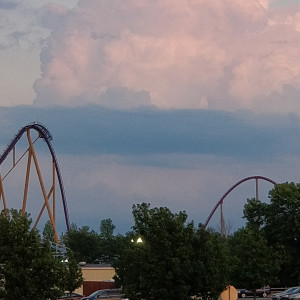
lol its actually my ride. MR RC embedded my video cuz I goofed the code. Thanks for that tho.
Also, @Hlcoasters (post from 4 days ago), that looked fantastic. Roll transitions are beautiful. Layout is a lot of fun. Good stuff.
@CG - Spectrum looks surreal in that video. Very excited to watch raw pov now.
Once you upload it to one of these sites how do the judges know how to find it?
^^It would be biased in favor of Jetcoasterfan.

For exporting the array or any other modifier, just enable the "apply modifiers" option in the dae exporter settings. Just be careful when doing this with linked copies, since you must use single user meshes to export different modifier configurations, if you do not ensure this manually, the result will probably not what you expected, which also happens to me sometimes, but which is actually kind of logical since neither the dae file format nor no limits 2 does know the concept of modifiers like blender does. So you would export a new mesh for each different modifier setting.
That means for example that an object using an array count of 4 and another with 8, but both referring to the same pieces, that one of the two settings would be applied to both objects that link to the same mesh when the "apply modifiers" option is selected.
For linked objects I guess there's a bug preventing the exporter from exporting it when "selection only" is active. I think this will be quickly fixed, without that it works fine here for now, I'm not often using objects linked between blend files. Actually I think I should also warn that linking whole objects instead of the data (meshes, materials, etc.) could potentially also cause some trouble during export since you could have two objects with the same name but different content, which could confuse NL2 since as far as I know this is not allowed for dae files, but blender would export it.
I hope the contest will have the jet coaster style and it will be mandatory!!
Sorry if I missed this, but what time does the challenge start? I’m still tying to figure out if there’s any way I can participate
Hello,
after a long period of retries i suceeded to use the array modifier for generating multiple parts arranged on a circle. This is useful for weels etc. You must use an empty object that is placed at the position of the first next part with the correct angle orientation. And the same scale as the original part has! (this was not mentioned in all books, even not in the official blender handbook) I have tried it until now just with primitive objects like cubes (scaled different for x, y and z), cylinders etc., not for complex parts.
Now i can see the correct object and exported it to dae-file. But in NoLimits there is only the first element of the array, all other copies are missing! The same problem occures when i use linked copies (imported parts from other blender files with link, not append). All linked copies are missing in dae-file. If i use other parts with append, they are visible in NoLimits. When i can not use the array modifier i have much more work: i have to copy&paste the parts and than rotate it around midpoint (set 3D-cursor to it and rotate by 3D-cursor) for each part separately. If i have used textured for this parts, i have to reassign the texture files for every part because i get copies of these texture files. If i have e.g. 12 parts, i have to make 11 times copy&paste and i have 11 copies of texture files.
Are there solutions for these problems? For missing linked copies in dea-files and for unwanted copies of texture files when i make copies of objects (with append or copy&paste, not links)?
Best regards
15001 to 15020 of 19728