
^ it just annoys me that people are still doing that; it’s like, it’s one of the simplest things and for some reason there is still so many that miss it. It just grinds my beans T_T
All Comments
14881 to 14900 of 19728Filter comments

Updated my recreation of the Rookburgh entrance:


This might be really simple, and might just be a dumb question, but.... old Arrow coaster chains usually go extreamly slow untill the car catches it, then speeds up to a resonably fast speed.... still pretty dang slow, but still... Figure i need scripting for this, so thougt id ask..... Help?
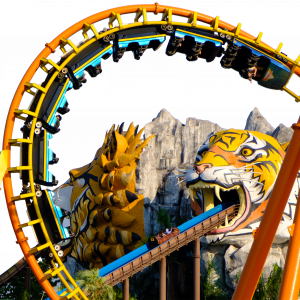
Making the Zierer's Hell Diver coaster.


Go vote in our first week back after 5 Hours of Power! NoLimits 2 Screen Shot Saturday Madness July 21st
-Ride_Op

Lookin' sexy.
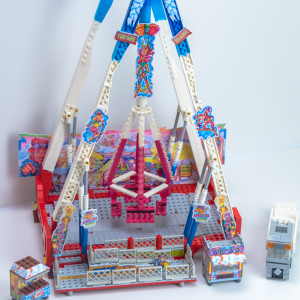
Hello everyone, after some time without touching Medusa Steel coaster, I decided a few days ago to resume/advance this RMC start during January. Here are the images taken today. Most of the supports are finished, I just have the heartline supports to completely redo.


^ yeah that would be rather handy

The possibility to choose if you want the lift to be in "idle" or completely stopped if there is no train on it

Nor Titan or Ring Racer have inversion, so I expect vest restraints...
And Titan looks like a craft from El Loco parts.
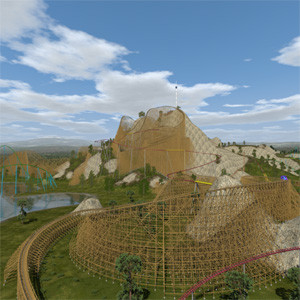
Hello,
if you make videos, it does work, otherwhies you can remove it from scene. Now i have found also a "dirty" solution: I have made a copy of the blender file from the car, removed all exept the dashbourd and found, that this was also invisoble in NoLimits. I have removed all faces exept three bigger of them - still invisible. But bounding boxes in blender are much greater than these faces. If i extrude the faces, i see now some additional edges. These edges are coming from some isolated vertices. But before extruding, these vertices are not visible in blender, you cannot select them and not delete them.
So i have taken the complete dashboard, exportet it to dae-file and opened the dae-file. The small dae-file for the three faces revealed ca. 10-20 NAN numbers in file, these seems coming from the isolated vertices. In the dae-file of the complete dashboard i found also these NANs, i replaced them by "0.0". Now i imported the changed dae-file in blender and found some additional wrong faces all having a vertex at (0,0,0). These are coming from the changed NANs to 0.0. I have deleted all these wrong faces and stored the dashboard as blender file. In the blender file of the car i deleted the dashboard and applied the new dashboard and stored this blender file. I exportet this car to dae-file and imported it to NoLimits. And now there is no error message (no NANs anymore) and i can also see the dashboard. Now i have to adjust the material files so the surfaces looks as i want.
This car is for the very big park containing a wooden coaster with a length of more than 7000m (there are more roller coasters, one has a time machine theme, the wooden coaster has a western theme). The supports of this coaster need the most calculating power of my grafic card, the delorean car does not add so much more, it is much less than 10%. Since i have the ASUS ROG Strix GeForce GTX1080Ti-11GB, this big park is now running much smoother as before with my old graphic card. There are some moments where the frame rate goes down, but it is not, when the car is in camera direction, it is when a lot of the supports are in camera direction.
If i make videos, they are smooth, making the videos need now about twice the time than the ride itself, with the old grapfic card it was more than five times the ride time... Making 4k-videos and scaling down to full-HD with video editor reduces some aliasing, the videos looks very good, even on my 2m screen of my home cinema.
Best regards
I think the Titan trains were designed exclusively for Titan.

^ That object is in no way suitable for realtime rendering. Don't use it.
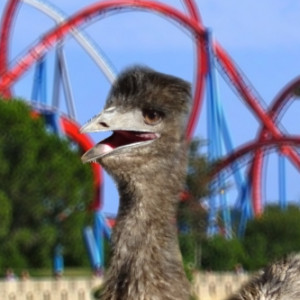
I suspect the titan trains were effectively designed to replace the ring racer trains so I reckon it'll be those newer trains with an updated restraint style to be able to withstand inversions etc, so if be inclined to say it's gonna be a pretty crap ride
Hello,
i have a new problem, i have downloaded this model (a Delorean from Back to the Future):
https://www.blendswap.com/blends/view/68371
After some hard to solve problems i was able to import a fair good model in NoLimit. First i have all converted to meshes. Most objects are 2-dimensional objects that have only one side with material, if you look from the "wrong" side, you can see trough. I solved it by copying these objects with SHFT-D, switch to edit-mode, select all faces and flip them. Now each face is double with its own material, so you see it from both sides.
All parts could be made visible and after making a lot of material file for NoLimits, i can adjust each material. Exept one object of the Delorean, the "Main_Dashboard". It remains invisible in NoLimits, even if there is a copy with flipped faces. If i make a Copy by CTRL-C/CTRL-V and move this copy over the car and import this, i can see the car in NoLimits (without main dashboard), but not the copied dashboard above the car. If i copy the seats the same way, i can see them in NoLimits, the seats have the same material as the dashboard.
If i import the dae-file with blender, i can see the dashboard again, the original and the copy... I have no idea, what is coing on. The material cannot be the reason, because the seats have the same material and are visible. Only difference: the seats have only one material, the dashboard have three materials for dirrent faces. But all faces of the dashboard are invisible. My idea was to make a copy of the dashboard and use this copy, but all copies are also invisible. Any idea? Is there a switch in blender to make an object invisible? But in blender i can see it. How can i make a copy of the mesh only, just the mesh geometry, i hope that i can use this copy as replacement for the original dashboard. It is sufficiant if this new copy has only a simple diffuse material, the material itself is not critical.
The properties of the dashboard and for the seats look the same, i cannot find any difference, even the properties for the material. I cannot find any constraint for both. So frustrating because the model is nearly perfect but only one object is missing.
Edit: i get an error message "caanot decode float value NaN" when i import it to NoLimits. I have made a test copy of the car with only the dashboard remaining and still have this error message. So this error belongs to the dashboard. But i do not see, which value has become a "NaN" and why. It is not a division by zero (that gives "Inf", not "NaN"). The Mesh is complicated like a lot of other objects in the car, it is difficult to delete parts of the dashboard until i find the bad part. Blender itself has no error message, even if i import the dae-file. If i select the dashboard and swich to edit-mode and select all faces, some of the edges are not black but cyan, what does that mean?
Best regards
How about the Ring Racer trains?


Say I made a Zero G Roll for example yeah, then I add a section where I add a slope --- because of course the after the roll is downwards --- so it's leveled and added a section where it's straight afterwards, but the slope after the g roll and the section after that slope still have some roll with it, like it's baking a bit to the right or left. Well I guess what I'm really asking as well if it's ever necessary to be exactly at zero with no continuous roll? It's ideal to have a straight section, I think I know how to do it manually which would be a lot of work.

can you elaborate on what you mean by a section with no roll?
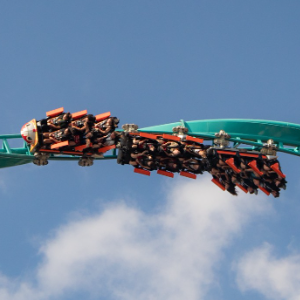
Can confirm those trains are by S&S and damn do they look similar to the rendering - oh god please let it be those and not trains with the Galeforce-type restraints
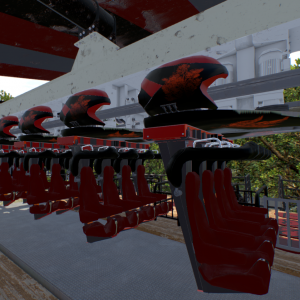
The adding in of the various dive machine train/track styles, like floored ones with smaller gauge track
14881 to 14900 of 19728