


Ultimate Attachment Tools can do this.(i think)
All Comments
1301 to 1320 of 19724Filter comments

Double track transfer table is a better descriptor for this. Very common on Arrows, and some Disney coasters when they want to pull a train to the side while leaving track aligned with the main circuit, usually for disabled loading.
-Ride_Op
Right I see. Annoying! And yes, purely for realism they should look at it.
MrRC posted on June 10th, 2024
Hi, Elliot,
Can u provideus with an image , so its easier to look at.
He has explained it already as "two pieces of track that move evenly on the table and are parallel", it's basically any GCI transfer track.
As far as I'm aware? It's not possible unfortunately, but I suppose a hack could be done via cloning the coaster layout and custom block scripting? It's not ideal though, and it's definitely something that needs to be looked into by the dev team.
Hi, Elliot,
Can u provide us with an image , so its easier to look at.
Hi all,
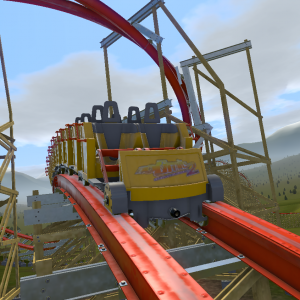
Was just wondering if it’s at all possible to create “oldschool” transfer tables in NL2? I’m trying to recreate Megafobia from Oakwood Theme Park which has an old-style CCI transfer table where there are actually two pieces of track that move evenly on the table and are parallel.
When you want to remove a train, you slide the table to the left, track 2 now being in the main ‘loop’. You put the train on this table, then slide it over to the left, thus the main track is now back on the loop and the train is stored on track 2 to the right.
I’m aware this isn’t really possible in NL2 as standard. Is there a script that exists to make this possible? Thanks.
Silveed posted on May 31st, 2024
Problem: I find it hard to stop the rolling of track, especially if I want to transfer to a straight section. I usually try to use the quartic function but figured that this is limiting and describes more the intamin intimidator305 style, while the quintic function gives me room for much more flexibility, in the style of the modern vekomas. But once I want to force the track to be perfectly leveled out for x time, I fail to get it under control. I saw that a particular version of fvd++ has a "roll to zero“ function that would probably solve all my problems. But I am using the program on my m1 air and couldn't find the version with that function included. Does anyone has an idea of how to fix that handling issue?
It looks like you still have -1 deg/s of roll rate entering the straight section. I'm not sure how you did this with just quartics and quintics, but in general I would always suggest just using either cubic or sinusoidal functions for everything and adjusting the tension and centers to make the shaping more natural and nuanced. This allows you to have far more control over just about every aspect of shaping.
Going back to your question, the "roll to zero" function was experimental for a reason and made the program crash a lot. To get your roll to zero without this (which first requires that you bring the roll rate to zero with a +1 deg/s cubic or sinusoidal function), you just have to just use trial and error. First, get the straight section close to flat with shaping you are happy with. Then adjust the previous roll transition's length, center, and tension until the roll value is at or very close to zero.
Hopefully that helps!
Mad Mouse @ Quassy?
Can we have a larger image ?

RealizeCoaster posted on June 6th, 2024
Maybe Speed Rockets @ Jardin d'Acclimatation
Nada
MrRC posted on June 6th, 2024
Ultimate @ Lightwater Valley ??
Nada
Ultimate @ Lightwater Valley ??
Maybe Speed Rockets @ Jardin d'Acclimatation
UtahCoasterEnth posted on June 5th, 2024
I need my magnifying glasses.

I want to ride free
I want to ride free
I want to ride free from your cost
You're so fat from profit, I won't pay you
I've got to ride free
You create it, you share it, we feature it!
-Ride_Op
DereeeckL posted on June 4th, 2024
any1 know how to properly import TCM's D6 Trains?
Did u downloaded the PKG file and placed them in your park ?
If yes, send me your PKG file of your park to my email (see my profile) Subject : NLC Request
MrRC posted on June 3rd, 2024
No. Just export the model as a *.dae and use a attachment script to place it on the track.
Thx you very much !
any1 know how to properly import TCM's D6 Trains?
Lakokille posted on June 3rd, 2024
MrRC posted on June 2nd, 2024
I make custom trains with Google Sketchup.Really, we don't need to be very precise for the wheels et the other thinks ? Do you use CCC 0.4 for importing the trains in NL2 ?
No. Just export the model as a *.dae and use a attachment script to place it on the track.
MrRC posted on June 2nd, 2024
I make custom trains with Google Sketchup.
Really, we don't need to be very precise for the wheels et the other thinks ? Do you use CCC 0.4 for importing the trains in NL2 ?
1301 to 1320 of 19724