
Colossos at Heide Park?
All Comments
13141 to 13160 of 19729Filter comments


How many polygons is that...
While we are at the topic of support generation - a smarter collision detection would be nice as well.
As of now, what it does is simply remove portions of the supports that would otherwise generate. However, this results in some problems.
Diagonal supports (running from left/right, not forwards/backwards) that are vertically offset, for instance, will have their top floating in the air if the corresponding support that it would usually attach to is removed. The ending caps are also not enabled, so I have to go through all supports that are affected and enable them manually, otherwise you can see into the support.
I've also had that problem on the handrails leading up to a transfer track, all ending caps were non-existent, which can be pretty apparent.
SiIvagunner's rips are like a box of chocolates. You never know what you're gonna get. Some of the ones I found more memorable and listen to repeatedly:
Super Mario All Stars SMB3 Invincible
Athletic Theme (PAL Version) - Super Mario World
Athletic Theme (Hard Mode) - Super Mario World
Flower Garden - Yoshi's Island
Baby Bowser - Yoshi's Island
Don't Deal with the Devil - Cuphead
Keyhole - Super Mario World
Unfounded Revenge - MOTHER 3
Your Best Nightmare (Alternative Mix) - Undertale
This is the channel that I've compared XYZCoaster to.
I am probably not able to finish the Castle Tower ride in time for November 18th. Fortunately, I found another project that I have not filmed yet. I'll add some more theming there to add to the story behind it

1 month left!
Keep those teasers going!
-Ride_Op

Putting the final touches..

I know that the wooden supports generator is in need of huge overhaul (that i'm assuming will happen with the RMC update whenever that happens), but in the mean time i have one small and should be easy to change/fix request for the existing support generator.
when banking the track, there is a point at which the generator decides that the banking is too high to use just one beam and will insert a 2nd beam that goes horizontally across the structure, like this:

in the simulator, it seems to me that this cutoff angle is right about 45 degrees.
however, I've noticed that on most actual rides that angle seems to be a lot closer to 10-15 degrees as seen on:
mine blower (gravity group):

and mystic timbers (gci):

it seems like something small like that could be as simple as just changing a few variables in the support gen code, so if possible, this would be greatly appreciated
Hello,
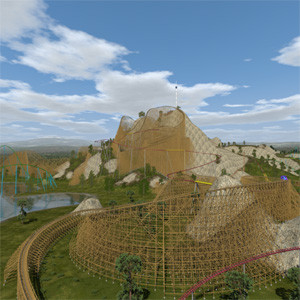
i think, my last posting was lost or never send by my computer. It seems to me there is no solution for me, the mesh of the track remains black. But i can still use it when i place all meshes of my building in solid display mode, here i can see all my meshes and also the mesh of the track but without the textures. But i can see if there is no collision with the track. I have made some walls including holes as windows and tunnels where train is running through. Than i can switch to texture display mode and deselect the track mesh and place textures on my meshes. After saving file i remove track and save it with different name and export it to DAE-file. Now i can import it in NoLimits. Until now the Castle fits perfectly to the track, train is running through windows and tunnels without collision. It is a complicated theming for the coaster, but it is possible with a lot of work.
So this solution works for me, thank you for the tip how to import LWO-files, it reduces a lot of work even when i cannot put textures on it. The problem with blender seems to be the possibility to configure it completely individual so each one has a "different" blender version that looks different and has different menu points enabled. E.g. my blender looks different than the screenshots, some menu points are not present. This makes help for other users very difficult.
So i can work with exported track as LWO-file. But it is interesting if it is possible to store a mesh only with its geometry but without any materials or textures and import it again so it is similar to meshes that you add as new basic meshes like cube, cylinder etc. Perhaps i will try to export the track mesh as different 3D-files and reimport them, with much luck one case will work because the "wrong" material or texture information will be lost...
Best regards
Ride_Op posted on October 14th, 2018
Visit this site (linked below) and choose these options:
- Product re-delivery
- My download link expired
- Did not order "Extended Download"
Fill out the form. The support team will respond.
https://ccc.element5.com/ccc/customer_service.html
-Ride_Op
It turns out, since making this post I have found the old installer on my old hard drive. However, I still do not have the license key. I notice that on your second step, another option given is "Lost license key", is that where I would go? I'm going to try it.
EDIT: It worked, thank you
im not sure if your in the right forum, have you tried asking in the "How Do I ??" forum
this i where im confused since im not really sure what to do, im not sure but,would it would be something like identify the button, state what its purpose is and then add it to the script, in the place of the left click.
also i was thinking about it would it be better to be a light that turns on and stays on with one press and then press it again and it turns off??
or am i making it a tad to complicated
Get up, come on get down with the roundup
You riders get up come on get down with the roundup
245 up come on get down with the roundup
Coasters are the gift, that has been given to us
Roundups are all about your creations. You make things and we show them off, it's that simple!
5 weeks left until Roundup 250! Entries due November 18!
-Ride_Op

Has anyone made a Larson Flying Scooters model I could use?
Now the old wooden hotel house building has a new coaster stuffed into it. 
The idea is not to study how they are made (you can watch his live streams if you are interested in this) but to make them playable on lower range computers which cannot even handle them properly in the carefully designed larger funfair map where they are all present at once.
These rides were not designed to be suitable to be placed in random NL2 maps but are designed to be played in the specialized funfair maps where many measures have been taken to balance the ride quality and performance and now are even available to be played in standalone packages.
I'd rather recommend to use Materials instead of "UV-Textures". While they are a quick way to texture simple things they are deprecated and blender 2.8 will for example not support them anymore as far as I know. Using explicit Materials with Textures is also more in common with how NL2 uses Materials and Textures and this also avoids any confusion you are now confronted with when using imported objects.
Here's the setup I recommend to set and check the UV-Mapping with the Blenderer Renderer. You should also then export Materials instead of UV-Textures. (You are also able to use other images in the Image Editor as backgrounds and they are not essentially the same textures that are drawn on the objects in the viewport anymore).

Maybe even more future proof and using state of the art techniques would be using the cycles renderer, it can also not use UV-Textures and tehrefore there is less confusion. You also don't have to enable environment lighting in it, it will just automatically do it like that if there's no lamp in the scene:

And to be ready for the future, same setup for one of the latest 2.8 alpha versions:

I found these flat rides on Coastergalexyworlds website. !http://coaster-galaxy-world.de/resources/categories/flatrides.4/ They all need passwords though. I was starting to make a mountaintop funfair with a jetcoaster going around the edge of the whole thing. I was going to use these flat rides. But i guess not since they all need passwords. Whats the point of a resource for people to study how the flat ride was made when you cannot even extract it.
13141 to 13160 of 19729