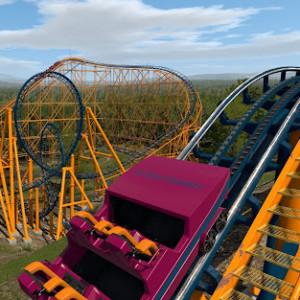
"An ode to Millennium Force"
25 years and my trains are still
Tryin' to get up that
Great big hill and slope
For a thrill sensation
Our next Mega Roundup contest will happen with Roundup 600.
You create it, you share it, we feature it!
-Ride_Op

"An ode to Millennium Force"
25 years and my trains are still
Tryin' to get up that
Great big hill and slope
For a thrill sensation
Our next Mega Roundup contest will happen with Roundup 600.
You create it, you share it, we feature it!
-Ride_Op
EK gaming posted on January 7th, 2025
can you dm me the train download?
Here is the link for the 6 Seat : https://drive.google.com/file/d/1rRgZk1i7k0etdRkTjDkrw3lNv1tCmx1D/view
Here is the link for the 8 seat https://drive.google.com/file/d/1n-fQ3J9p6qC75_uChjwX9-OQ5nUJCulB/view
Look better in previous posts !! :-)
Coastin' Dave posted on February 18th, 2023
GangstaSlime posted on February 17th, 2023
Looking for anyone who has either the 8-seat or 6-seat custom dive coaster trains? Been looking for them for years and still no luck.
I have the six seater one. DM me.
can you dm me the train download?
Anyone got any instructions for the D6 trains? They don't seem to work like other custom trains I've downloaded
popfilms posted on January 4th, 2025
Absolutely love the generator. One question I have is if there is a way to get a switch to reset before the next block is free, like the 'move back to exit track' feature in thekadani's custom block logic builder.
I didn't include that feature because, in general, reallistically speaking, that'd be a huge safety concern. Imagine that for some weird reason your train didn't make it over the next hill (think on a strong wind gust pushing the train backwards) and rolled backwards towards the now disengaged switch with no way to stop it in between. That'd be really bad.
To have the switch reset instantly, I'd recommend setting up a block, even a short one, after the switch. The switch will be automatically freed as soon as the train enters that extra block instead of waiting until the next one. And, reallistically speaking, you'd have a way to stop the train before the switch in case it rolled back.
For some future update, I already kinda planned to somehow (still polishing the details on my head) add a feature so that in auto mode, a block won't let a train go if the next AND the next are free. That'd help in this case with my suggestion: you'd hold the train before the switch until the small block after the switch and the proper next one would be free, preventing any non-emergency stops in the small block, but again, I'm still polishing the details on how to do that...
nerfer10 posted on January 4th, 2025
Hey, I'm not sure if this is an issue specific to my computer or an issue with the mac export in general, but when I try to open it on my M1 Macbook air (11.5.1) I get an error saying I don't have permission to open the application. I have my Mac gatekeeper completely disabled by the command line, which usually should let me run any application downloaded from the internet, so I'm not sure what's causing this issue exactly.
Sadly, as I say in the original post, I'm not even sure what I'm exporting on Mac. I have absolutely no way to check it, as I don't have any Mac computers. Just in case it was an issue with the actual file permissions (read-write-execute), I have zipped the file again from a Linux file system (that supports the execute permission) and updated the link above.
Summary, try downloading the program again and checking again; and let me know if it worked. If it doesn't, though, I'm not sure I'll be able to fix it easily...
Any updates on if this technique worked? I've created a trench using a 2nd coaster and setting it as invisible & virtual, but now i cant get my original coaster's supports to lower into the trench...
Hey, I'm not sure if this is an issue specific to my computer or an issue with the mac export in general, but when I try to open it on my M1 Macbook air (11.5.1) I get an error saying I don't have permission to open the application. I have my Mac gatekeeper completely disabled by the command line, which usually should let me run any application downloaded from the internet, so I'm not sure what's causing this issue exactly.
Absolutely love the generator. One question I have is if there is a way to get a switch to reset before the next block is free, like the 'move back to exit track' feature in thekadani's custom block logic builder.
Friends of the NoLimits Community, we would like to invite you to join NLC’s Third official Three Blind Mice in NoLimits 2! This reboot of the NL1 competition was a smash hit with a record turnout of over 36 participants (12 total teams of 3) in 2021 and nearly double in 2023 with 60 total participants (20 total teams).
If you’re not familiar, the format is simple. You are randomly assigned into a group of 3 - 1 track builder, 1 supporter, and 1 themer - with each person given 3 weeks to do their part before passing it along to the next. (This is 1 additional week per role from the previous 2 weeks, a new change with this edition of the competition)
The project AND its team are kept entirely secret until the livestream reveal at the end. Following the livestream, the 3rd participant is able to upload onto the exchange.
You can check out the previous livestreams below:
3BM 2021
https://www.youtube.com/watch?v=BNBiVkgtcz0
3BM2 2023
https://www.youtube.com/watch?v=i-Ks4wvELKc
In this entry form (check back 1/4) enter your username, email, and list your preference of the desired role from 1st to 3rd, with 1st being your top choice. If you have no problem doing any of the 3, please elect “No Preference.”
You may also elect “substitute”, in case we can’t secure a spot for you on a team, and a participant has to back out midway through. You can not be a substitute and also have a role on another team; names will be entered on a first come first serve basis. Please note, by being a substitute you are committing to any of the 3 roles.
All names will be entered into a randomizer and you will be notified of your role after the deadline to enter (info on that down below). We will need your email to share your file to the rest of your team!
Each role is responsible for performing tasks that are relevant to their role.
The Track Builder develops a single, floating, colorless roller coaster layout with no name. Their responsibilities/restrictions include:
Selects coaster style, car, and train count
NO RMC/WOODEN RIDES ALLOWED
Designs full layout, maintenance layout, block timing, etc.
CAN use block scripts
CAN use Type Settings for any piece of track
Can NOT use Style Settings for any piece of track
Can NOT use Supports, Terrain, or Scenery Tab
Can NOT select colors, coaster name
Can NOT add supports, scenery
Can NOT add any wording, or description to Coaster Properties or Park Settings window
Can NOT show any portion of the ride, in progress or complete, to ANYONE other than myself for questions/troubleshooting.
Can NOT build multiple coasters, including hidden ones. Only 1 “Freeze-able” coaster will be accepted with the name “3BM 2025 Coaster”
The coaster can operate in continuous OR shuttle mode.
Dueling/Racing Coasters can be 1 mobius track or multiple tracks within the same “Freeze-able” coaster
Uploads unencrypted NL2 Package to submission form provided to them upon role assignment
IF THE RECEIVED FILE IS DEEMED UNREASONABLE FOR SUPPORTER TO TACKLE IN 3 WEEKS, TRACK IS SUBJECT TO REJECTION, AND TEAM WILL BE DISQUALIFIED
The Supporter will be supporting the colorless roller coaster provided, defining the relationship between the track and the ground/any surface that supports it. Their responsibilities/restrictions include:
Add supports to coaster that connect to the ground
Can NOT modify Track Layout Geometry or Functional Ride Timing, Operational Mode, or Physics … WITH EXCEPTION of using the “Move” and “Rotate” functions ONLY (No “Mirror”) to reposition the layout in world-space as a whole unit.
CAN modify coaster Style settings and separators ONLY , adjusting spine type, crosstie spacing, and tunnels
CAN hide station roofs in the event of close track encounters
CAN make floating supports as long as they are purposeful, structural, and communicates to the Environment/Themer they intent to connect to a surface other than the ground
CAN “stylize” supports (ie “themed” supports) as long as they are structural and connect the track to the ground/surface
Can NOT create 3D objects to “ground” supports, that is Environment/Themer’s Responsibility
Can NOT use the Scenery Tab or change the Environment
MAY use a Clearance Envelope object while building as long as it’s removed before submission
CAN hide Transfer Track Supports to make custom ones, if applicable
CAN use the Terrain Tab to modify and (optionally) paint the terrain
Can NOT modify coaster track or settings, or support colors
Can NOT show any portion of the ride, in progress or complete, to anyone.
Uploads unencrypted NL2 package to submission form provided to them upon role assignment
The Environment/Themer will be determining the theme and appearance for the roller coaster provided, giving the project a name, its colors, and the environment for the ride experience. Their responsibilities include:
Selects colors, name of coaster
CAN use Scenery Tab to add or create scenery of all types. This includes (but is not limited to) foliage, lights, 3D objects, custom trains, custom track, scripted sequences, etc.
CAN create custom environment (.nl2env)
CAN use Terrain Tab to modify terrain AS LONG as it DOES NOT modify the supports’ relationship between the track and the ground
CAN create custom trains, custom track, and .nlsco scripts
Can NOT modify Track Layout Geometry or Functional Ride Timing, Operational Mode, or Physics
CAN modify coaster style settings and separators, use caution as this may impact supports with different spine settings
CAN modify transport/brake visibility pending the desire to add custom track hardware and infrastructure (eg custom stators, brake fins, sensors, etc.)
Can ONLY modify station and storage settings to SHOW/HIDE building structures, or modify transport/brake style and visibility (ex: tires, LIMs, etc)
CAN add additional coasters for utilitarian purposes only or background (eg, other coasters in a “park”)
CAN edit Park Settings with Project name and Optional Description (NO MENTION OF USERNAME)
MUST provide a desired “Splash Screen” in Park Properties
Can NOT show any portion of the ride, in progress or complete, to anyone, even after submission.
Must upload the completed project as an unencrypted NL2 Package to the submission form provided
MUST NOT BE UPLOADED OR SHARED IN PROGRESS OR TOTATILITY UNTIL CONCLUSION OF LIVE STREAM REVEAL
ARE NOT PERMITTED TO DISCLOSE THEIR ROLE on discord, forums, or to peers AT ANY TIME during the active competition
ARE NOT PERMITTED TO DISCLOSE THEIR ROLE UNTIL AFTER the livestream reveal
ARE NOT PERMITTED to go beyond their scope of work
ARE NOT PERMITTED TO REVEAL ANY PORTION
If an entrant fails to perform the above tasks, their team’s entry is at risk for disqualification.
The projects will be assessed in 4 categories:
Individual Performance of Track Builder
Individual Performance of Supporter
Individual Performance of Themer
Combined Performance, Project “Cohesion”
The projects will be assessed by a combination of judges who are aware of the team personnel, and others who will be “blind” and not know the team pairings until the livestream reveal.
Current Confirmed Judges:
A113
Amalia
Pear
Keltan
Joseph
Sat, Jan 4 @ 11:00 AM Eastern Standard Time (EST): Entry Form Open
Wed Jan 8 @ 9:00 PM (EST): Entry Form Deadline
Sun, Jan 12 @ 11:00 AM (EST): Roles Assigned via Email. Track Builders may begin when notified; other entrants please standby
Sat, Feb 1 by 8:59:59 PM (EST): Track File Submission Deadline. Files are processed and then distributed to supporters, who may begin when files are received. Distribution times may vary, dependent on when files are received.
Sat, Feb 22 by 8:59:59 PM (EST): Support File Submission Deadline. Files are processed and then distributed to environment/themers, who may begin when files are received. Distribution times may vary, dependent on when files are received.
Sun, March 15 by 8:59:59 PM (EST): Environment File Submission Deadline, Project Complete! Files are processed and then distributed to judges for review. Judges will be blind; in other words, not know who is on each team until…
TBD: Livestream announcement showing the top finishers and revealing team members for each project. Environment/Themers permitted to upload their teams’ ride onto exchange with fellow team names after livestream concludes.
Hello, I haven't had any luck uploading a coaster for a week now... I keep getting the "Something went wrong with your upload, and we've already been notified and are probably looking into it as you read this. You'll get a PM from us when we've looked at and resolved any potential issues." message, but a week later and no PM and no explanation as to what's wrong. Any ideas? All I'm trying to upload is a .nl2pkg file and a JPG image.
I've just released an update to the script generator. The highlights of this update are:
The download link is in the first post (I'll always replace the link there to make it easier to find for newcomers).
Any questions and suggestions, as always, don't hesitate to ask them right here.
All is quiet before the day
Maintenance work gets underway
Check mechanical, electrical, PLC
Routine repairs before the day
Our next Mega Roundup contest will happen with Roundup 600.
You create it, you share it, we feature it!
-Ride_Op
@ CCA
Did u got it to work ?
I am stoppable
I'm a coaster with all brakes
I'm unfixable
Yeah I break ever single day
I was powerful
Now my systems are in decay
I'm unconfident
Yeah I am stoppable today
Our next Mega Roundup contest will happen with Roundup 600.
You create it, you share it, we feature it!
-Ride_Op
@ ThatFlyerGuy1
I understand but so this user i did send it to, he can look how all the settings are done, it was including a colored cube and *.NL2MAT file
Is there a reason you insist on doing everything by email? You don't help anyone by doing things by email. Forums should be a community resource.
For those who don't know:
You need a basic understanding of the NL2 Shader language.
Result = Entity0; -- you MUST include the semicolon.Make note of which Entity you have enabled (there's 8 to choose from!). Replace the 0 with the entity number - 1 (i.e. the first Entity will be Entity0, the second will be Entity1, etc).
CCA_Games posted on December 23rd, 2024
I know this may sound silly but does anyone know how to make the colors apply to certain Entity Numbers in the NLSCO Materials tabs?
Check your email
I made a lil test with a colored cube, 1 side only to see how it works.
Feel free to ask again.
Hey, I never worked with it but maybe this can help you:
https://nolimitscoaster.com/nolimits2/help/pages/fileformats.html
Click on "CSV (Spline Import/Export)"
Reading there the "UP-Column" is "The x-component of a normalized normal vector pointing in the up direction of the virtual car moving along the spline." Furthermore "the front, left, and up vectors are three linear independent unit-length (normalized) vectors..."
So you should not expect multiples of 10 there. The values should be smaller 1.
So following the explanation in the link: "Pos" is the position of the spline-point and the other three values "Front", "Left", "Up" are three vectors standing on this position like a virtual car would. I think, this rather complex definition is necessary to get an unique definition of the track including banking. But I am no expert of this feature, so maybe its wrong how I understood it xD
Skye posted on December 23rd, 2024
I'm not using this function in my PRO version. So i have no experience with it however.
Good luck.