
Haven't been on here in a long while, cause I really haven't touched the program. but I'm hopping on the RMC bandwagon and creating a coaster for the first time in a long while.

Haven't been on here in a long while, cause I really haven't touched the program. but I'm hopping on the RMC bandwagon and creating a coaster for the first time in a long while.
RCT3andNL2stuff posted on January 13th, 2020
Cliff Hanger @ Ghost Town in the Sky/Ghost Town Village
Correct
Used image :

Yes correct
Cliff Hanger @ Ghost Town in the Sky/Ghost Town Village
Great American Revolution / La Revolución / Revolution / New Revolution @ Six Flags Magic Mountain ?
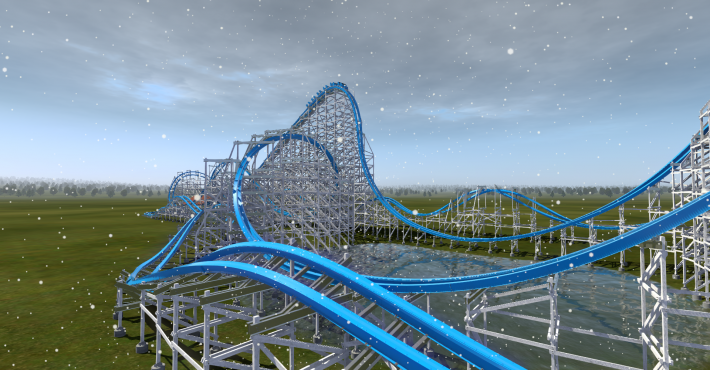 i made this
Here is the next one

Pro tip: when generating RMC style supports, go to the segments that you want catwalks and hand rails on and set those in the style settings. Then when generating the full structure, uncheck the options for catwalks and hand rails when building the whole structure.
As for eliminating "wobble", I covered that in the official webinars. You don't need a spine to do it. It's a matter of using strict roll nodes with continuous roll nodes set somewhere between 4 and 8 degrees different than the strict, then continue rolling from there. A little trial and error and you're all set to smoothly transition from strict track into and out of a roll.
-Ride_Op
UtahCoasterEnth posted on January 12th, 2020
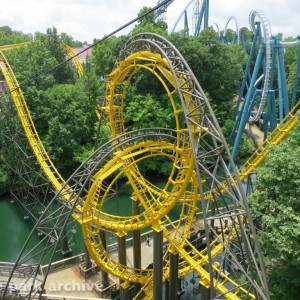
Roller Coaster at Funny Land.
Image used: https://rcdb.com/11361.htm#p=43081
Yes thats correct
UtahCoasterEnth posted on January 12th, 2020
AceDFe19 posted on January 12th, 2020
Hey, does anyone knows how to turn off shadows in NL2?
Go to setup on the main screen and its under the details tab I believe turn shadows down to zero.
Thanks alot!
^You have to do that via segment style settings and then individual settings under 'wooden support generator'.
Is there any way to create proper/any catwalks for the hybrid coaster type? lift/brake catwalks like on other coaster types don't generate on the hybrid coaster, and using the wooden generator to create catwalks applies it to the whole ride instead of just the lift/brakes. Any way to fix this?
AceDFe19 posted on January 12th, 2020
Hey, does anyone knows how to turn off shadows in NL2?
Go to setup on the main screen and its under the details tab I believe turn shadows down to zero.
yes, another RMC. i tried this a few year ago with TheCodeMaster´s first rmc trains and rails but it didn´t turn out that well because i wasn´t that good in nl2 and didn´t have a lot of knowledge about shaping. this is my first proper rmc with rmc shaping and i´m still learning to shape the elements and manging the forces
Womp83 posted on January 12th, 2020
RedLimitsCoasters posted on January 12th, 2020
Is there an easy way to get rid of the "banking wobble" on Wooden/Hybrid coasters? There is no Spine that I could line up with the Spline/Heartline. Is there anything else I can use or do I have to try to get it right?
I haven't actually built anything in NL for a while now, but if i remember correctly, i think it has something to do with strict roll/banking nodes. I think you uncheck the box so they're not strict. See if that helps you.
That's not the problem i've got. I'm talking about that problem that's caused by the continus roll thats used by NL2. Take a look at the Handbuilding Bible Thread. There is the explanation to get rid of it but that tehcnique only works for tracks that have a spine in the middle and Wooden/Hybrid coasters don't have one
RedLimitsCoasters posted on January 12th, 2020
Is there an easy way to get rid of the "banking wobble" on Wooden/Hybrid coasters? There is no Spine that I could line up with the Spline/Heartline. Is there anything else I can use or do I have to try to get it right?
I haven't actually built anything in NL for a while now, but if i remember correctly, i think it has something to do with strict roll/banking nodes. I think you uncheck the box so they're not strict. See if that helps you.
Roller Coaster at Funny Land.
Image used: https://rcdb.com/11361.htm#p=43081
Hey, does anyone knows how to turn off shadows in NL2?
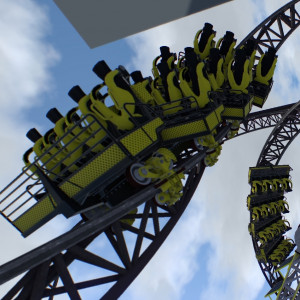
People keep asking me for my Vekoma Trains so I give in :P. Here they are:

Download Vekoma MK1101 Trains by PvM
Please note that I created these trains for my personal use. These are as is and won't be updated. I also won't make trains on request.