
How do I download stuff like a park entrance or buildings?
All Comments
3541 to 3560 of 19728Filter comments
Send me a request by PM
MrRC posted on March 26th, 2022
tornado posted on March 26th, 2022
10/10 Amazingly Awsome You won
No problem, feel free to ask if u have any scripting questions.
Especialy rotating / moving scripting is my speciality.
can you make me one of those that i can use
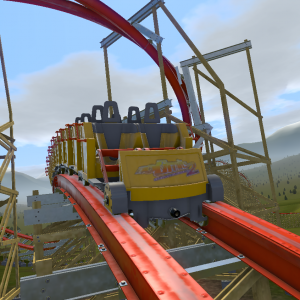

Anyone know where the modern 8 seat B&M dive trains are? I have found the 6-seater but not the 8. Thanks!
Thanks for the response. I AM getting my picture on the car, but it's just a small segment of it - a bottom corner. My problem therefore seems to be one of "scaling". I'm quite happy with picture manipulation, and have reduced it several times till it's 5% of what I started out with. However, it still displays the same. Is there some "no. of pixels" rule, perhaps?

You can edit the existing cartexture files pretty easily. This will retain all of the detail such as blemishes and textured pieces as a plus. Just locate where these are stored on your computer, make a copy, and place that in your park folder, then you can edit away in your favorite photo manipulating software. If you have steam, just right click on the game in the library, select properties, then local files and browse. The folder should be there.
A little more info, and I'm no expert here but this is my experience, you'll notice several different files for each coaster type. The important ones are "cartexture_01.png" and "cartexture_01_colormap.png"; you may also have a "cartexture_02.png" etc. for types with a zero car. The cartexture is obviously the file that you see wrapped onto your coaster cars, it'll have the NL logo on it. Edit this file 'til your heart's content, then have a look at the colormap file. Just looking at the files side by side, we can see black outlines for all of the details and the NL logo, with gradients elsewhere. Black on the colormap will preserve whatever is on the cartexture file while white will show the color you pick in the NL editor with the gradients being somewhere in between. You should be able to work it out from there, depending on your understanding of PS/Gimp/whateverelseyouuse.
Also, there is a pack out there with all of the textures with the logo removed, however the link doesn't seem to be available.
I'm attempting something new (for me) - cutomising trains/cars. I want to attach my own pics to a train/car. I've had a dabble for a few hours but things aren't turning out like I expected! For starters, I've tried. jpg and .png images. Does it matter which? Secondly, the pics I've tried seem too big. How do I get it so it fits completely on the front of the train? Sorry if this is a bit basic, but I couln't find any related detail about it anywhere. Thanks.
thanks Dave
View comment
so ive downloaded a few parks from the exchange that have Morgan trains, example Blue Hurricane, where did you guys get them? the park was encrypted so i couldnt get the trains from it. if anyone can make a download in the exchange for them that would be great.
tornado posted on March 26th, 2022
10/10 Amazingly Awsome You won
No problem, feel free to ask if u have any scripting questions.
Especialy rotating / moving scripting is my speciality.
MrRC posted on March 26th, 2022
10/10 Amazingly Awsome You won
Dm Me at [email protected] or [email protected] the download for your vekoma slc so i can ride it and rate it GL Best Rating out of 9 wins 7/9 Is Automatic win
at hershey
mine is vekoma mk1212
3541 to 3560 of 19728