I've been replaying Pokemon White and have inevitably gotten the Driftveil city theme stuck in my head.

I've been replaying Pokemon White and have inevitably gotten the Driftveil city theme stuck in my head.
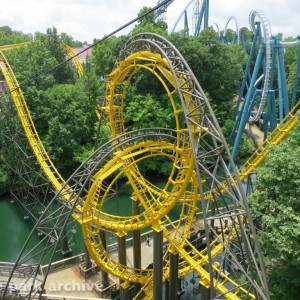
... featuring first outward rotating wingover drop.
@BEAMER3K
U need to remove the timestart at the link to YouTube (&t=604s)
Just released a new coaster....
I hope you guys like it.
Pippin at Kennywood is complete. Notice the similarities with Jack Rabbit. That might be why the ride was remodeled for the 1968 season.
My next recreation will probably be Comet at Lincoln Park. Maybe the original Ravine Flyer at Waldameer.
Had to wait for the right week!
-Ride_Op
It's about time Ride_Op used the lyrics from Billy Idol's Rebel Yell tune. Very clever.
Teaser image of Guardians of the Galaxy Cosmic Rewind :

Updated image :


In the Roundup hour she cried 4, 4, 4
On the Rebel Yell she cried 4, 4, 4
You create it, you share it, we feature it!
-Ride_Op
My preferred fly-by position is in the middle of the front seats, just above the zero car or nose rather than just slightly above the track. If I'm filming a wing coaster, 4D, or spinning coaster I just leave it in ride view.
When in ride view, press Q to go to something called 'Fly-By View'. It's perfectly centered, and you can use X and Space to move the camera up and down to your preferred height. And if needed, W, A, S, D, and right click mouse to move it around to anywhere else, just like in fly view.
Premier Rides Sky Rocket trains. like the ones on Sky Rocket at Kennywood
No there's no sure way that I know of. I pause the sim, turn the camera around, and line myself up with that little circular bumper thingy (sorry I don't know the technical term) that's at the front of the train. That tends to work for me.
PvM posted on August 8th, 2022
yes exactly. Unless you want all of them to be equally spaced. Then you could do a pass with support connectors as connector ties.
Ok, as I'm new to 3Ds max, I'll try to do it. I might have some more questions while doing it.
yes exactly. Unless you want all of them to be equally spaced. Then you could do a pass with support connectors as connector ties.
PvM posted on August 8th, 2022
yes of course. You can create a track style that doesn't have a backbone. As for the track connectors. I always create those just like regular ties from the plugin and then use the align tool to align them to existing ties on the track.
Thanks for the answer. So you place each support connectors one by one?
yes of course. You can create a track style that doesn't have a backbone. As for the track connectors. I always create those just like regular ties from the plugin and then use the align tool to align them to existing ties on the track.
Is there any possibility to do a coaster track without a backbone that also features a track to support connector?
Six weeks left to build and film!
-Ride_Op
Go through these videos: https://www.youtube.com/playlist?list=PL20Dp8jCv533Ez0klBGr0IsflGpXc_k25
In them I break down how our editor works and why we chose that method. Along the way you'll learn the key techniques to get the most out of each feature.
-Ride_Op