

Hi I am new to all the FVD++ stuff and I want to try making my coasters with it but I don't know how or where to download it can somebody help with this? Thank you!
All Comments
2361 to 2380 of 19726Filter comments
On my ride, I've been dropping and looping
Helix never comes, never leads to braking
Airtime satisfies when I'm getting close
Closer to the belt and the clamshell lap bar
You create it, you share it, we feature it!
-Ride_Op
What is Roundup 500?
Every week the NoLimits 2 team searches YouTube and creates a top 10 list of the best NoLimits 2 videos found that week. Beginning with Roundup 100, we started making it an annual contest to submit the most amazing works for the chance to be featured on one of the Mega Roundup lists. Honorees have received prizes for placing on these lists. Check out the jaw dropping amazing work from Roundup 100, Roundup 150, Roundup 200, Roundup 250, Roundup 300, Roundup 350, Roundup 400, and Roundup 450!
What are the rules?
The rules are fairly simple: Build an amazing coaster or ride experience in NoLimits 2 with great scenery fitting some kind of theme or story, film the ride, edit the video to music, then post it to YouTube unlisted and fill out the entry form.
Some more rules:
- You may work in a team, though only one prize is awarded
- The coaster/ride experience must be your own work. You can't take someone else's park/coaster and film it to call it your own even if you get permission. (Note: you can download & use free/shared/commercially available scenery files...just give credit where due)
- The coaster/ride experience should not have been released before - new work please so there's a surprise when your video comes out!
- Videos should be 3-5 minutes long. Yes you can make it shorter/longer, but keep it captivating.
- Please include the full ride experience in your video.
- Scenery should cover all of the default terrain environment. Remember, you only need to build what the camera sees, but we will see plain undeveloped default flat terrain and it won't look that good.
- Please don't show off all the surprises or full POVs of your work. Keep it secret until the list is revealed - the surprise is more fun!
How do you judge the results?
All entries are judged on 3 main categories:
- Quality of the Ride Experience
- Quality of the Scenic Design
- Quality of the Presentation
Ride Experience looks at what the finished ride experience is like. Is it fun? Does it flow well? Does it tell a story? Your creation does not have to be the biggest, flippiest, fastest, launchiest, anythingest. In fact, a well themed family coaster has taken the top spot before. A key aspect of this category is the theme or story told by your ride. Thematic elements should have a purpose for being there, and with a short amount of time on the ride it's important for the theme or story to show very efficiently.
Scenic Design looks at the quality of the scenery surrounding your ride creation. We consider foliage (if present), lighting, sets, animated objects, special effects, sound effects for the ride, surrounding area visuals, and everything else built to be part of the attraction. The best attractions seem to take us to a different place. The scenic design is the stage on which your attraction performs and should compliment the theme or story of your ride.
Presentation boils down to video editing. This is a video contest, so your finished video should be sharp, well edited, and feature lots of great shots that capture and hold our attention. Music selection is just as important as the music should underscore and support the emotion of the ride experience. Ideal length for a video is 2-4 minutes. You of course can go longer, but it becomes increasingly difficult to keep long videos interesting. Less is more. Note, please include a full POV of your ride. Also note, we don't need a walk through of your queue nor do we need a full uncut ride up the lift if nothing happens other than going up (see captivating).
Great! How do I enter?
Click here to fill out the submission form!
FAQs
Can I work in a team?
Yes! Only one prize will be provided however.
Do I have to make all the scenery/scripts/textures myself?
No, you can download pre-built scenery, scripts, and anything else you need to fulfill your vision. Please give credit where credit is due to the original creators.
Can I show off what I'm working on?
Yes - but keep the ride experience a surprise. We really want that magical moment and amazing reactions when people see your video for the first time when the Roundups are announced. Showing a screen or two, even a limited video teaser, is fine. When you show a full POV of your attraction you leave no surprise for the Roundup reveal. That is why we ask your finished video to remain UNLISTED so that your finished ride experience is revealed the day Roundup 500 comes out.
Can I use copyrighted music?
Yes you can! Important Warning: Make sure that you can actually use it. We've seen entries that the music was stripped out because the copyright did not allow it to be used on YouTube. Our best recommendation is to upload a test video with the music you want to use and then see if there are any restrictions. Most of the time the restriction is that you can't monetize the video but you can use the music. Sometimes the music can't be played in certain countries. On rare occasions the music can't be used at all in any form. It's best to figure this out BEFORE you spend a week editing the video to that specific music only to learn it's been removed from your video.
Last time there were only 7 winners? How many prizes will be awarded?
Correct, in Roundup 450 only 7 honorees made the final list. Roundup 500 will have a minimum of 5 honorees on the list, with a maximum of 10.
I have more questions
Ask below!
-Ride_Op
Hey folks, we're thrilled to announce the coolest prize ever to celebrate the upcoming mega Roundup 500! The honorees who make the official Roundup 500 list will receive a fully functioning NoLimits 2 control panel built by Lev's Inventions!

Mega Roundup 500 will be revealed on September 6th, with entries due September 4th. See the next post for all the rules. Questions? Ask away!
-Ride_Op
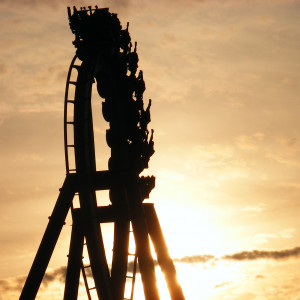
Flip Flap Railway! What a painful experience. It only operated from 1895-1902.
My next recreation will be Wildcat at Woodside Park.
yoda posted on April 10th, 2023
figured it out, you hold ctrl and scroll
OK, good luck
Blender and a bunch of trial and error. Also I only made the Mack track. 3DSMax would have been easier if I had that.
figured it out, you hold ctrl and scroll
I don't work with but is it possible something like "snap" ? or "grid" ??
Whenever I add to the length in geometric function, it always jumps from 3 to 4, and I want it to go to 3.1 and so on. Can anyone tell me the setting to change that?
So I try to download the free trial as a business but it now needs a phone number verification. I just want this tool for blender.
Just a head's up - the B&M i-beam track, especially on older inverts, has a gap down the middle, and the spine depth transitions are typically smooth.
reserved
reserved
Included track styles:
Corkscrew Rounded Ties

Regular: Yes
Alternative 1: No
Alternative 2: No
Utility: Yes (lift hill)
Track gauge: 1220mm
Rail diameter: 140mm
B&M Invert

Regular: Yes
Alternative 1: Yes (medium spine)
Alternative 2: Yes (large spine)
Utility: Yes (I-beam spine)
Track gauge: 1220mm
Rail diameter: 140mm
B&M Sit-down

Regular: Yes
Alternative 1: Yes (medium spine)
Alternative 2: Yes (large spine)
Utility: Yes (I-beam spine)
Track gauge: 1220mm
Rail diameter: 140mm
Gerstlauer New-gen (light)

Regular: Yes
Alternative 1: Yes (3 tube track)
Alternative 2: Yes (heavy duty 3 tube)
Utility: Yes (2 tube, no diagonals)
Track gauge: 1200mm
Rail diameter: 159mm
Intamin Mega (Hyperion style)

Regular: Yes
Alternative 1: Yes (double spine)
Alternative 2: Yes (2 tube)
Utility: Yes (lift hill)
Track gauge: 1220mm
Rail diameter: 140mm
Intamin MK2 (Patheon Style)

Regular: Yes
Alternative 1: Yes (double spine)
Alternative 2: Yes (diagonal bracing)
Utility: Yes (2 tube)
Track gauge: 900mm
Rail diameter: 140mm
Mack New-gen (light)

Regular: Yes
Alternative 1: Yes (thicker spine)
Alternative 2: Yes (2 tube)
Utility: Yes (lift hill)
Track gauge: 1060mm
Rail diameter: 140mm
Mack Sit-down

Regular: Yes
Alternative 1: Yes (thicker spine)
Alternative 2: Yes (2 tube)
Utility: Yes (lift hill)
Track gauge: 1060mm
Rail diameter: 140mm
Meisho (Big Boom Coaster)

Regular: Yes
Alternative 1: Yes (looping box)
Alternative 2: No
Utility: Yes (lift hill)
Track gauge: 1000mm
Rail diameter: 140mm
Morgan Hyper Coaster

Regular: Yes
Alternative 1: No
Alternative 2: No
Utility: Yes (square spine)
Track gauge: 1000mm
Rail diameter: 140mm
Premier Rides

Regular: Yes (plate ties)
Alternative 1: Yes (box ties)
Alternative 2: Yes (box ties, thick spine)
Utility: Yes (double plates)
Track gauge: 1000mm
Rail diameter: 140mm
RMC Raptor

Regular: Yes
Alternative 1: No
Alternative 2: No
Utility: No
Track gauge: 318mm (12.5”)
Rail diameter: 99mm (3.9”)
S&S Sit-down

Regular: Yes (box ties)
Alternative 1: Yes (2 tube)
Alternative 2: Yes (Ring Racer plate ties)
Utility: Yes (lift hill)
Track gauge: 1100mm
Rail diameter: 140mm
S&S Thrust Air

Regular: Yes (diagonal bracing)
Alternative 1: Yes (no diagonal bracing)
Alternative 2: No
Utility: Yes (thinner ties)
Track gauge: 1400mm
Rail diameter: I-beam 150 x 300mm
Schwarzkopf Olympia Looping

Regular: Yes
Alternative 1: No
Alternative 2: Yes (looping box)
Utility: Yes (2 tube)
Track gauge: 900mm
Rail diameter: 130mm
Wooden Side Friction

Regular: Yes
Alternative 1: Yes (station right platform)
Alternative 2: Yes (station left platform)
Utility: Yes (lift hill)
Track gauge: 900mm
Rail diameter: N.A.
TOGO Default

Regular: Yes
Alternative 1: Yes (thicker spine)
Alternative 2: Yes (looping box)
Utility: Yes (lift hill)
Track gauge: 1100mm
Rail diameter: 140mm
TOGO Ultra Twister

Regular: Yes (open trough)
Alternative 1: Yes (rings)
Alternative 2: Yes (open trough reinforced)
Utility: Yes (station)
Track gauge: 2300mm
Rail diameter: 140mm
Vekoma Flying Coaster

Regular: Yes
Alternative 1: Yes (thicker spine)
Alternative 2: Yes (sideways track style)
Utility: Yes (Utility track)
Track gauge: 1100mm
Rail diameter: 140mm
Vekoma Junior Coaster

Regular: Yes (all same ties)
Alternative 1: Yes (alternating ties)
Alternative 2: No
Utility: Yes (lift hill)
Track gauge: 900mm
Rail diameter: 130mm
Vekoma MK1101

Regular: Yes
Alternative 1: No
Alternative 2: No
Utility: Yes
Track gauge: 1100mm
Rail diameter: 140mm
Vekoma Suspended Thrill Coaster

Regular: Yes
Alternative 1: Yes (thicker spine)
Alternative 2: No
Utility: Yes
Track gauge: 1000mm
Rail diameter: 140mm
Zierer / Schwarzkopf (Lisebergbanan etc.)

Regular: Yes
Alternative 1: No
Alternative 2: No
Utility: Yes (Utility track)
Track gauge: 900mm
Rail diameter: 130mm
Over a year in development, it's finally here. The next version of my track creator for 3ds Max. With this version you can:
- Create tracks with up to 4 different profile styles
- Create variable tie spacing on segments
- Variable segment lengths
- Create LODs
- Create clearance envelopes for all in-game coaster styles
You can download the plugin here:
Download 3ds Max Track Importer 2.1 for 3ds Max 2021 and up
How to install:
Simply unpack the zip-file anywhere you want but keep the folder structure intact. For easy access, it is recommended to extract it to your “\Program Files\Autodesk\3ds Max 20xx\scripts” folder. Next, move the “Track” folder to your NoLimits park folder. The track folder contains the predefined nl2co and nl2mat files to color and display your track properly in NoLimits2.
To run the script, start 3ds Max and select “Run Script…” under the “Scripting” Menu and navigate to the folder you unzipped the script to. Run the script and the NoLimits Track Create V2.x menu will pop up.
Please note that:
- Due to the complex nature of the plugin, I currently don't officially support creating your own styles
- I don't take requests for custom track styles
Updates:
2.1: fixed various bugs
- bug where transition between backbone thicknesses on various coasters didn't generate properly
- bug where coaster styles that use alternating tie patterns didn't always generate properly
- fixed materials on various coaster styles so that they export properly
- fixed various naming issues in the new gen Mack style.
Holy crap, this latest API update was amazing.
Now all we need is an ability to manually tell the station that a train is berthed without interfering with transports, brakes etc (there is a VERY fine margin of error with parking that I simply cannot work around at the moment, and I don't want transports or brakes to interfere when the train is in a position I'm satisfied with), and I'd be happy. Better yet, disconnect the functions from manual operation, and allow us to trigger things as and when we so desire.
The main function I'd like to see implemented would be something like this.
public final void setTrainInStation(int index)

Enables manual station functions without calling the station handler. Disables manual station functions when index is null.

Parameters:

index	 - 	Train index, must be in the range 0...getTrainCount()-1 or null.
As an aside, controlling button illumination would also be pretty cool.
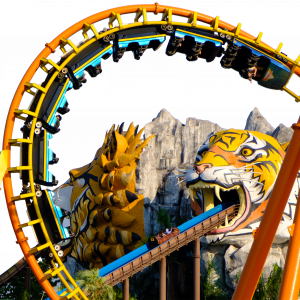
Twister - Fuli Ocean Happy World?
Twist @ Le Pal ?
Seirra sidewibder at Knotts
2361 to 2380 of 19726